Updating Fulfillment Service Location
This guide explains how to update your fulfillment service location in Shopify when your inventory is shipped from a different country than your webshop's billing address.
Why is this important?
When you first installed the eWarehousing application, the fulfillment service location was automatically set to match your webshop's billing address country.
For example, if your webshop's billing address is in the UK, the fulfillment service location was set to UK.
However, if you're shipping inventory from eWarehousing located in a different country (like The Netherlands), this can cause VAT issues. To fix this, you can now manually select the correct country where your fulfillment center is located.
Before you begin
To update your fulfillment service location, you first need to make sure your API access is up to date. If your API access is outdated, you'll see a button and red text warning on the settings page. If not then it will state Your API access is up to date.

Step 1. Update API access
Log in to your Shopify Admin.
Go to Apps > eWarehousing.
Look for any red warning text and buttons on the settings page.
Click the button to grant additional API access to the application.
Follow the prompts to complete the API access update.
Step 2. Select your fulfillment service country
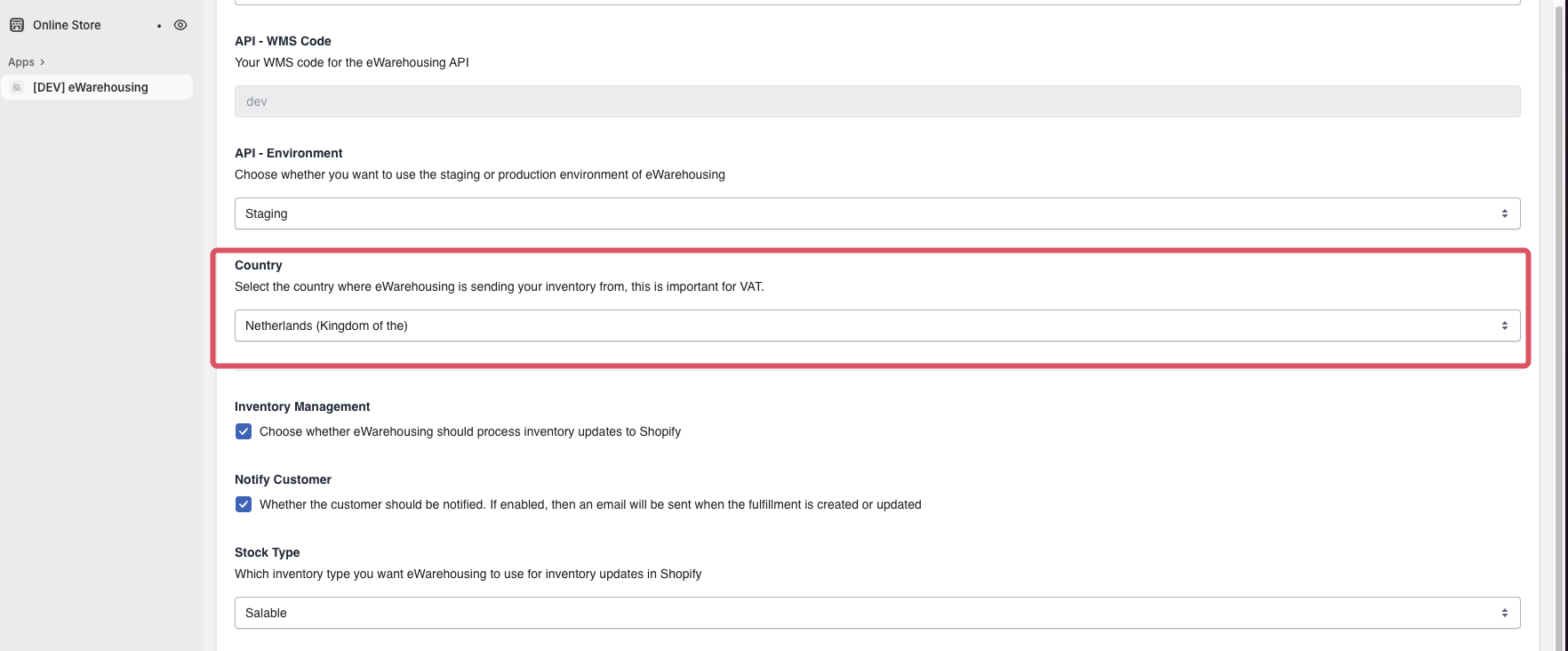
After updating your API access, return to the eWarehousing settings page.
Scroll down to find the Country section.
Click on the country dropdown menu.
Select the country where your eWarehousing fulfillment center is located (default is The Netherlands).
Click Save changes to save your selection.
What happens next?
After saving your changes, Shopify will automatically use the correct country information for all orders fulfilled through eWarehousing. This helps prevent VAT issues and ensures accurate shipping information for your customers.
If you have any questions or encounter issues while updating your fulfillment service location, please contact support.